


YI Life
4.273.00 Reviews
App Specs
- Version
- 1.2.8_20240618
- Updated On
- License
- Free
- Downloads
- 100,000+
- Developer
- ANTS TECHNOLOGY (HK) LIMITED
- Categories
- House & Home
- Platform
- Android, iOS
Screenshots

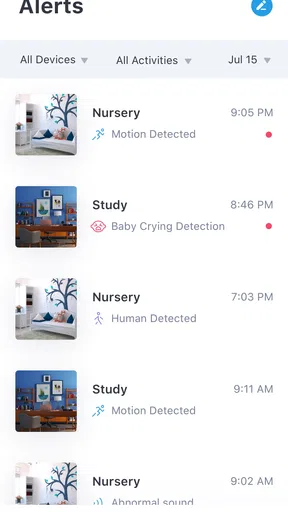
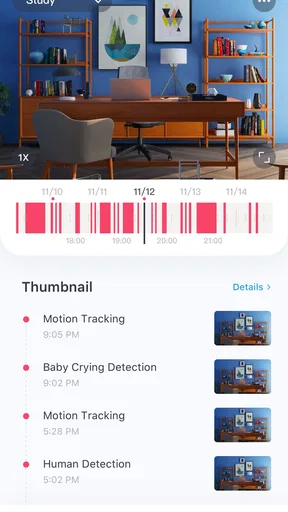
 Analysis by AppCompare
I’d start with the most practical question about YI Life: does it make sense for a household that wants to check in with people at home, rather than another app for managing chores? Its focus is real-time video and audio, which makes it a different sort of House & Home app from shared calendars, shopping lists, or smart-home dashboards. I find that distinction useful: it is about seeing and speaking with family when distance or a busy day gets in the way, not organizing every part of domestic life.
That focus also sets expectations. A video-and-audio connection is most useful when the people involved agree on how and when to use it. It is less compelling if you mainly need a written record of household tasks, a family calendar, or a broad messaging service. I would decide first what kind of check-in would genuinely help at home, then see whether a dedicated connection app fits that routine.
A practical place in a shared household
Think of a parent who is out running an errand while another family member is at home, or relatives who live apart and want a more immediate conversation than a text allows. In those moments, live audio or video can make a quick exchange feel more direct. It can be especially handy when explaining something that is awkward to describe in a message, such as where an item was left or what needs attention before someone arrives.
The trade-off is that a live call asks both sides to be available at the same time. A text is easier to answer later and leaves information that can be reread; a call can resolve a question quickly but may interrupt whatever the other person is doing. I’d treat YI Life as a way to make agreed check-ins easier, not as a replacement for every family conversation or a guarantee that someone will always be reachable.
For a shared device, I would also think about the room and the moment before starting a call. A device in a common area can be convenient for a household, but it makes the boundaries between a private conversation and a shared space more important. Agreeing on when a call is welcome and who is likely to answer is a simple, practical step that prevents the technology from feeling intrusive.
Set expectations before relying on it
Before making it part of a routine, I’d check that the people who need to connect can use the app and know which device they intend to use. A quick practice call is more useful than discovering during a rushed moment that someone is unfamiliar with the interface. If several people share a phone or tablet, decide whose account and device are being used rather than assuming the app will handle household roles automatically.
That is a meaningful difference from a family messaging group. A group chat naturally supports several people contributing at different times, while a live call is better suited to a direct exchange. If the household needs a clear record of instructions, a message or shared note may be the better companion. If the main goal is to hear a familiar voice or speak face to face, a live connection has a more personal feel.
Worth Reading Before You Choose

EA SPORTS FC Mobile 26 Is a Bigger Football Game, but It Takes Time

Flipboard Shows What News Apps Must Do Beyond the Feed

Switching to Android Auto Means Rethinking Your Driving Routine

Google Calendar Makes a Crowded Week Easier to Manage

Ludo King Makes the Most of the Minutes Between Plans

Baby Panda World Brings Quick Play to Modern Phones, but Its Game Library Feels Busy
I would avoid building an important routine around any app until everyone has a fallback. If a family member does not answer, a normal phone call or a message may be the more sensible next step. This is not a criticism unique to YI Life; it is simply the nature of relying on real-time communication. The app can make a check-in convenient, but the household still needs a plan for missed calls and changing schedules.
Who is likely to find it useful?
YI Life is aimed at family connection, so I can see it suiting households that want a straightforward way to talk over live video or audio. It may be a good fit for relatives who are comfortable with calls but do not want every interaction to happen through a large social platform. It can also appeal to people who value face-to-face conversation for brief practical check-ins, provided the other person is happy to use the same app.
I’d be less likely to recommend it to someone looking for a complete household organizer. The app’s stated purpose is communication, not a task board, calendar, or home-control system. Likewise, if your family already has a video-calling tool that everyone uses reliably, switching just for the sake of having another app may create more friction than benefit. A new communication tool is worthwhile when it solves a real gap, not merely because it is available.
Age, trust, and shared-device habits
The app is rated for Everyone, which makes its age context broad, but that does not remove the need for ordinary family judgement. A younger user may still need help learning when to answer, how to end a call, and which device is appropriate to use. I would explain those expectations in plain language and keep the first few uses simple. The age label is not a substitute for a household’s own decisions about supervision and privacy.
Trust matters just as much as ease of use. A live call brings the people and surroundings on both ends into the conversation, so it is worth choosing a suitable place and checking that everyone involved is comfortable. For a tablet or phone shared by several family members, be deliberate about who is using it and avoid treating a shared screen as though it were automatically private. Small habits like these help make communication feel respectful rather than surprising.
Cost, availability, and a sensible trial
The app is free to download, with in-app purchases listed at a wide range of prices. I would look at any purchase screen carefully before confirming anything and decide whether the free experience already suits the family’s routine. The presence of in-app purchases does not mean every household needs to spend; it is a reason to make a deliberate choice rather than tapping through prompts without checking.
YI Life is made by ANTS TECHNOLOGY (HK) LIMITED. It has a 4.2 average from around 9,700 ratings and has passed 100,000 installs, which suggests that other users have tried it, though those figures alone cannot tell me whether it fits a particular family. It was released on February 7, 2021, and the current version is 1.2.8_20240618. The minimum supported Android version is 5.0, so older Android devices may be within its stated requirements, while the device and operating system still need to work well for the people making calls.
My practical approach would be to install it on the devices the household actually plans to use, try a short call, and see whether the connection style feels natural. If people find it easy to reach one another without confusion, it may earn a place in the family’s routine. If they prefer asynchronous messages or already rely on another familiar calling app, there is little reason to force a change.
A Day in the Life with YI Life
Alright, picture this: you wake up in the morning, and all your daily tasks are laid out nicely in one place. That’s the magic of YI Life. The app's interface is super clean and intuitive. I mean, even if you’re not tech-savvy, navigating through it feels like a breeze.
Features That Caught My Eye
Now, let’s dive into some of the features. First off, the task manager is a gem. You can jot down your tasks, set reminders, and even prioritize them. It feels like having a personal planner without the hassle of carrying one around. Plus, the app syncs smoothly across devices, so you’re always up-to-date, whether you’re on your phone or tablet.
Another cool feature is the habit tracker. If you’re someone like me who’s always trying to build new habits, this feature is a game-changer. You can set goals, track your progress, and even get a little nudge if you’re slacking off. It’s like having a little coach cheering you on!
Staying Connected and Informed
Communication is another area where YI Life shines. The app integrates seamlessly with your calendar and contacts, making it super easy to schedule meetings or catch up with friends. And let’s not forget the weather updates; it’s like having a mini meteorologist in your pocket telling you if you need an umbrella.
I also appreciate the news aggregation feature. It curates articles based on your interests, so you’re never out of the loop. It’s perfect for those of us who love staying informed but hate sifting through tons of irrelevant content.
Customization and User Experience
Personalization is key, right? YI Life gets that. You can customize the app’s appearance to suit your style, which adds a nice personal touch. And let’s talk about user experience. The developers have clearly put a lot of thought into making the app user-friendly. The transitions are smooth, and the app runs without a hitch.
One little thing I found charming is the motivational quotes that pop up occasionally. It’s a small detail, but it adds a bit of positivity to my day, and who doesn’t love a good quote?
Final Thoughts
So, what’s the verdict? In my opinion, YI Life is a must-have for anyone looking to streamline their daily routine. It’s packed with features that cater to both your personal and professional life, making it versatile and practical.
Whether you’re a busy professional, a student juggling multiple commitments, or just someone looking to stay organized, this app has got your back. And the best part? It’s user-friendly, so you don’t need to be a tech wizard to make the most of it.
In the digital age, having an app like YI Life can make all the difference. It’s like having a personal assistant that doesn’t need coffee breaks. So, give it a try, and I bet you’ll be wondering how you ever managed without it!
Pros
- User-friendly interface makes navigation easy.
- Offers a wide range of customization options.
- Includes a detailed analytics feature.
- Integrates seamlessly with other devices.
- Provides robust security and privacy settings.
Cons
- Limited offline functionality available.
- Occasional bugs in the notification system.
- Some features locked behind a paywall.
- Initial setup can be time-consuming.
- High battery consumption reported by users.
FAQs for YI Life
What is YI Life and what features does it offer?
YI Life is a comprehensive lifestyle app that integrates smart home control, personal health tracking, and daily task management into one platform. It offers features such as remote control for smart devices, health monitoring with fitness tracking, and a customizable calendar to organize your day-to-day activities efficiently.
Is YI Life compatible with all smart home devices?
YI Life is compatible with a wide range of smart home devices, including lights, cameras, and thermostats. However, it’s always recommended to check the compatibility list on the app’s official website or within the app itself to ensure your specific devices are supported before downloading.
How can YI Life help with personal health tracking?
YI Life offers a robust health tracking system that monitors your physical activity, sleep patterns, and overall wellness. It syncs with wearable devices to provide detailed insights and personalized recommendations, helping you achieve your fitness goals and maintain a healthier lifestyle.
Are there any subscription fees or in-app purchases in YI Life?
YI Life is free to download, but it offers premium features through in-app purchases and subscription plans. These may include advanced analytics, exclusive device integrations, and ad-free experiences. Users can choose a plan based on their needs and budget, ensuring access to premium content.
Is YI Life secure and how does it handle user data?
YI Life prioritizes user security and data privacy. It employs encryption protocols and privacy settings to protect your information. The app complies with industry standards and regulations, ensuring that your data is handled responsibly. Users can manage their data preferences within the app settings.


